Most people use Claude Code like a vending machine: type a request, wait for output, repeat. It works — sort of. But somewhere between your fifth prompt and your fiftieth, things start to go sideways. Claude forgets a decision from ten minutes ago. A "quick fix" turns into an hour of undoing changes you never wanted. The output gets... off.
The short answer: that's not a Claude problem, it's a workflow problem. The developers quietly shipping faster with Claude Code aren't smarter prompters — they're combining plan mode, checkpoints, proactive context management, and the "think harder" prompt. Steal all three habits below.
Hack #1: Claude Code Plan Mode + Checkpoints = Fearless Refactoring
Here's a fear that keeps people typing tiny, cautious prompts: what if it breaks something?
Turns out, you don't have to be afraid. Claude Code snapshots your project before every single prompt. Something go sideways? Hit Esc twice and a menu of checkpoints pops open — restore your code, your conversation, or both. You can let Claude attempt something bold, decide it didn't work, and roll back only the files while keeping the conversation that explains why it failed. No git stash gymnastics. No panic.
Pair that with plan mode (Shift+Tab) for the genuinely risky stuff — migrations, big refactors, anything you'd rather catch on paper than in production. Plan mode keeps Claude read-only until you approve the plan, so nothing changes until you say so.
Put the two together and something shifts: you stop being cautious and start being ambitious. Big, sweeping coding tasks stop feeling risky, because you're always one keystroke from undo.
Hack #2: Fix the Silent Killer of Good AI Output — Context Bloat
Here's an uncomfortable truth: your context window is degrading your results right now, and you probably won't notice until the damage is done.
A bloated context makes Claude quietly worse — repeating itself, losing the plot, missing details you already told it. Most people only run /compact after they notice the slop. By then, you've already paid the price.
The fix is almost boringly simple: compact proactively. Finish a chunk of work? Compact before you move on, not after things break. And if you need a clean slate, /clear isn't the one-way door you think it is — /rewind can still pull context from before you cleared.
One more lever: a sharp CLAUDE.md file. Build commands, test commands, project quirks — write them once, and Claude starts every session already knowing your codebase instead of burning context rediscovering it.
This same principle — automate the repetitive parts so your attention goes to judgment calls, not busywork — is exactly what teams like GenExecutive apply outside the codebase, using AI-driven workflow automation and back-office support to clear operational clutter the same way a clean context window clears cognitive clutter for Claude.
Hack #3: The Secret Prompt That Makes Claude Code Think Harder
This one sounds too simple to be real, but it works: type "think harder" or "ultrathink" into your prompt, and Claude Code allocates dramatically more reasoning power before it answers you.
It's not a placebo — it's a real signal, specific to Claude Code's agentic loop (type it into Claude.ai's web chat and nothing happens). Save it for the moments that deserve it: architecture decisions, bugs that have already beaten you twice, plans you need reviewed before they touch real code. For everyday edits, don't bother — the default speed is already plenty.
The Real Hack? Stacking All Three
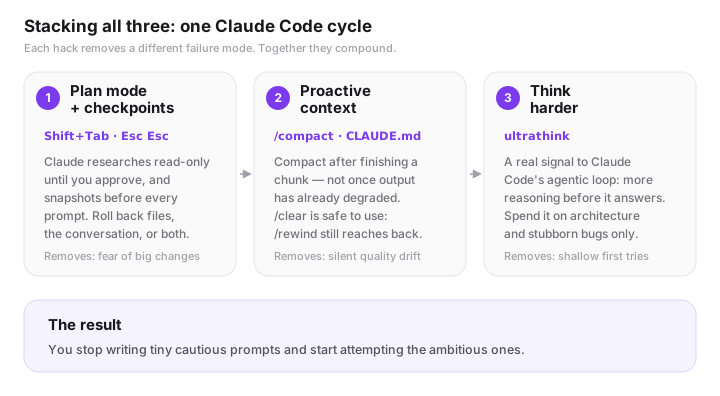
None of these Claude Code tips are complicated alone. The magic is combining them: plan mode for the big decisions, a "think harder" nudge when it's genuinely hard, checkpoints as your safety net the whole way through, and a context window you keep lean on purpose instead of by accident.
That's the difference between fighting Claude Code and flying with it. And if coding workflows are the first domino, the natural next step for founders and teams is applying the same automate-what-you-can, focus-on-what-matters mindset to the rest of the business — which is the whole premise behind our AI automation and back-office support services.
Want to see these habits in a real build? We used them to build a Claude Code Skill that analyzes video with Gemini and to run a LinkedIn outreach pipeline made of 11 Claude skills.
Go Deeper: Official Claude Code Documentation
Want the official word on any of this? Anthropic's docs cover each feature in more detail:
- How Claude Code works — the agentic loop and permission modes, including plan mode
- Choose a permission mode — Manual, Accept edits, Plan, and Auto, explained
- Checkpointing — how automatic checkpoints and
/rewindwork - Best practices for Claude Code — the four-phase workflow (explore, plan, implement, verify)
- Commands reference — the full list, including
/plan,/compact,/context, and/effort
Frequently Asked Questions
What is plan mode in Claude Code?
Plan mode (triggered with Shift+Tab) keeps Claude Code read-only while it researches and drafts an approach. Nothing touches your files until you review and approve the plan, which makes it the safest way to tackle migrations, big refactors, or anything you'd rather catch on paper than in production.
How do Claude Code checkpoints work?
Claude Code automatically snapshots your project before every prompt. Pressing Esc twice opens a menu where you can restore your code, your conversation, or both — so you can let Claude attempt something bold and roll back only the files if it doesn't work out, without losing the conversation that explains why.
What does "think harder" or "ultrathink" do in Claude Code?
Typing "think harder" or "ultrathink" into a prompt is a real signal specific to Claude Code's agentic loop — it allocates significantly more reasoning power before Claude responds. It doesn't do anything in Claude.ai's web chat. Save it for architecture decisions and stubborn bugs, not everyday edits.
How do I stop Claude Code's context from degrading my results?
Compact proactively with /compact after finishing a chunk of work instead of waiting until the output gets noticeably worse. A sharp CLAUDE.md file with your build commands, test commands, and project quirks also saves context by preventing Claude from rediscovering the same things every session.
What's the difference between /clear and /rewind in Claude Code?
/clear wipes your active context to start fresh, but it isn't a one-way door — /rewind can still pull context from before you cleared. That makes it safe to clear aggressively between unrelated tasks instead of letting old context linger and dilute your results.
Your turn: which of these Claude Code hacks are you already using — and which one are you trying today? Drop a comment and let me know what's actually working (or not) in your workflow. And if you've got a Claude Code hack that didn't make this list, I want to hear it.