Most founders don't lose deals because their offer is weak. They lose momentum because outreach is inconsistent — a good week of prospecting followed by three weeks of silence while the rest of the business catches fire.
Claude won't replace a sales team. But used deliberately, it can take over the repetitive middle of outreach — research, drafting, sequencing, qualifying — and leave your team to do the one thing AI still can't: build the actual relationship.
The short answer: Claude can automate LinkedIn outreach by handling ICP definition, prospect research, message drafting, follow-up sequences, CRM logging and reply triage — as long as a person still reviews every message before it sends.
A note on terms: the "skills" here are repeatable jobs Claude does in an outreach workflow, not a specific product feature — though any of them can be packaged as a reusable Claude Code Skill, the way we package Gemini video analysis.
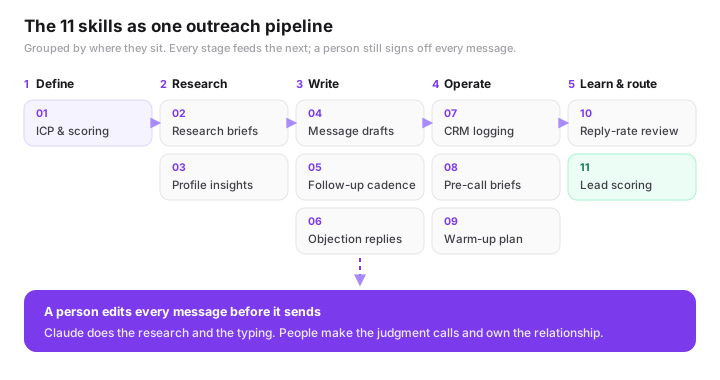
Below are 11 ways we deploy Claude for clients running LinkedIn-led outreach, roughly in the order they'd sit in a real pipeline: from defining who's worth talking to, through to flagging who's worth a human's time first.
In this guide:
- ICP & scoring criteria
- Prospect research briefs
- Profile-to-insight summaries
- Personalized message drafting
- Multi-touch sequence building
- Objection-response library
- CRM enrichment & logging
- Pre-call meeting briefs
- Warm-up engagement planning
- Reply-rate analysis
- Lead scoring & handoff
1. ICP & scoring criteria
Turning a vague "ideal customer" into scoring criteria. Before Claude can find good prospects, it needs to know what "good" means. We feed it closed-won deal notes, firmographic data, and a few example customers, and have it produce a written ICP: company size, role, signals of urgency, disqualifiers. That document becomes the filter every later step runs through.
2. Prospect research briefs
Building research briefs from public information. Given a company name and a role, Claude can pull together a short brief from public sources — recent news, funding, hiring trends, product launches — so a rep opens the conversation already knowing what's going on inside the account, instead of starting cold.
3. Profile-to-insight summaries
Summarizing a profile into talking points, not trivia. Given the text of a prospect's public LinkedIn profile — role history, posts they've shared, groups they're in — Claude can distill it into two or three genuine talking points. The goal isn't "I saw you went to State U." It's spotting the actual overlap between their world and your offer.
4. Personalized message drafting
Drafting first-touch messages that don't read like templates. Fed the ICP, the research brief, and your existing voice (past messages that worked), Claude drafts a first message per prospect rather than one message blasted at everyone. A rep still reads and edits every line before it sends — this is a first draft, not an autopilot.
5. Multi-touch sequence building
Mapping a follow-up cadence, not just one message. Most replies come after the third or fourth touch, not the first. Claude can lay out a full sequence — connection request, value-add follow-up, case study, break-up message — with each step building on the last instead of just repeating "just following up."
6. Objection-response library
Preparing answers before the objection shows up. "We already have a solution." "Not the right time." "Send me info." Claude can draft a short library of responses to the objections your team hears most, so reps aren't improvising a pricing answer in the middle of a DM thread.
7. CRM enrichment & logging
Keeping the CRM honest without the manual data entry. Connected through tools like Zapier or Make, Claude can turn a raw conversation thread into a clean CRM entry — stage, next step, key detail — logged automatically instead of at 6pm on a Friday from memory. This is the same CRM and workflow automation we build for clients outside of sales, too.
8. Pre-call meeting briefs
A one-page brief before every call. Before a discovery call, Claude assembles everything gathered so far — the research brief, message history, objections already raised — into a single page. Reps walk in prepared instead of scrolling three tools trying to remember the thread.
9. Warm-up engagement planning
Warming an account before you ever send a DM. Cold outreach lands better when it isn't actually cold. Claude can flag which target accounts have recently posted or commented publicly, and suggest a genuine, specific reply — so your name is familiar before the first direct message arrives.
10. Reply-rate analysis
Finding out why one message outperforms another. Given a batch of sent messages and their reply rates, Claude can look for patterns — message length, opening line, time sent — and turn them into a short list of what to test next, instead of a gut feeling about "what's working."
11. Lead scoring & handoff
Deciding which replies deserve a human, first. Not every reply is equally urgent. Claude can triage incoming responses against your ICP and buying signals, and surface the handful that genuinely warrant a same-day human reply — so your best rep's attention goes to your best prospects, not whoever replied first.
The pattern across all eleven isn't "AI replaces the rep." It's AI removing everything between the rep and the conversation that actually matters.
Where this tends to go wrong
Every one of these skills works better with a human editing the output than running on autopilot. Teams that get burned by AI outreach usually skipped this step — sending Claude's first draft unread, at volume, to people who can tell. The teams that see the strongest reply-rate lift keep a person reviewing every message before it goes out; Claude just makes sure that person's time goes into judgment, not typing.
- Keep a human reviewing every outbound message before send
- Start with ICP and scoring — everything downstream depends on it
- Feed Claude your real voice and past wins, not a generic brand brief
- Route only qualified replies to your best closer — not everyone equally
- Keep Claude working on information your team gathers — LinkedIn's User Agreement prohibits bots and scraping on the platform itself
The same rule applies well beyond sales: automate the repetitive, rule-based work and keep people on the judgment calls. We cover how to choose in the founder's guide to what to automate first.
Focus on the conversation. We'll handle the outreach.
This is exactly the kind of system the GenExecutive team sets up and runs for clients — research, drafting, CRM, and qualification, working together — so your team spends time closing, not researching. See how our AI automation service works, or book a discovery call.
Frequently Asked Questions
Can Claude automate LinkedIn outreach?
Claude can take over the repetitive middle of outreach — defining your ICP, researching prospects, drafting personalized messages, building follow-up sequences, logging to your CRM and triaging replies. It won't replace the relationship-building, and every message should still be reviewed by a person before it sends.
Is it safe to send AI-written LinkedIn messages?
Only with a human editing every message before it goes out. Teams that get burned by AI outreach usually sent the first draft unread, at volume, to people who can tell. Treat Claude's output as a first draft that saves typing, not as an autopilot.
What should I automate first in LinkedIn outreach?
Start with your ICP and scoring criteria. Every later step — research, drafting, sequencing and qualification — runs through that filter, so a vague ICP makes everything downstream worse.
How does Claude connect to a CRM?
Through automation tools such as Zapier or Make. Claude turns a raw conversation thread into a clean CRM entry — stage, next step, key detail — which the automation then logs, instead of someone entering it from memory at the end of the week.